
Humanitarian Data Exchange
by dividor · Search
HDX MCP Server provides access to humanitarian data through the Humanitarian Data Exchange (HDX) API - https://data.humdata.org/hapi. This server offers 33 specialized tools for retrieving humanitarian information including affected populations (refugees, IDPs, returnees), baseline demographics, food security indicators, conflict data, funding information, and operational presence across hundreds of countries and territories. See repository for instructions on getting a free HDX_APP_INDENTIFIER for access.
Humanitarian Data Exchange (HDX) MCP Server
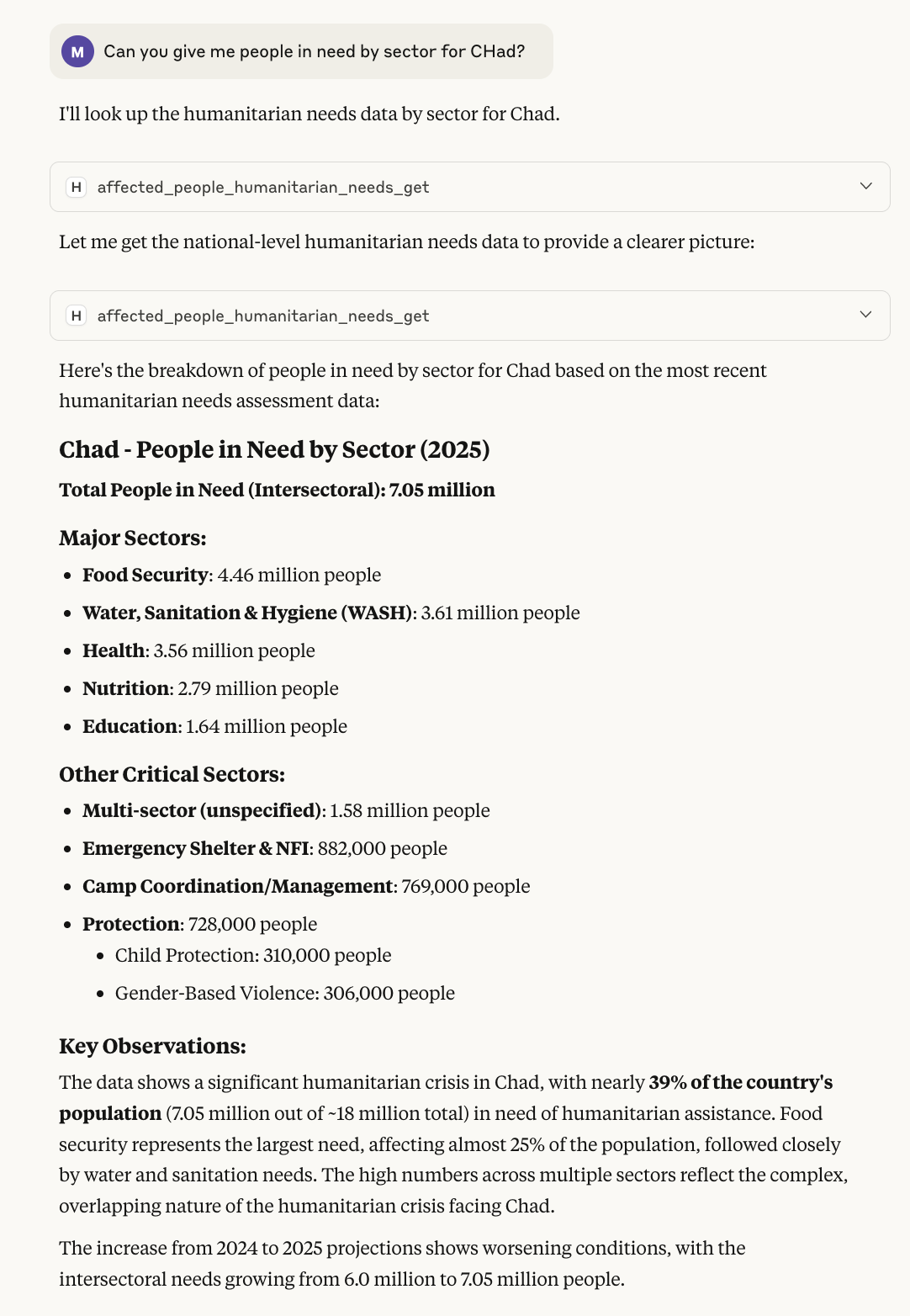 Example of using HDX MCP server used in Claude Desktop
A Model Context Protocol (MCP) server that provides AI assistants access to the Humanitarian Data Exchange (HDX) API. This provides a wide array of humanitarian data hosted on the Humanitarian Data Exchange.
This server can be installed in AI platforms such as Claude Desktop, as well as run as a remote MCP server for any AI to access.
Available Tools
🔍 Metadata & Discovery (12 tools)
metadata_location_get- Get countries/locations in HDXmetadata_admin1_get- Get states/provincesmetadata_admin2_get- Get districts/countiesmetadata_data_availability_get- Check data coverage (use first!)metadata_dataset_get- Get dataset informationmetadata_resource_get- Get resource detailsmetadata_org_get- Get organizationsmetadata_sector_get- Get humanitarian sectorsmetadata_currency_get- Get currency infometadata_org_type_get- Get organization typesmetadata_wfp_commodity_get- Get WFP commoditiesmetadata_wfp_market_get- Get WFP markets
🚨 Affected People (4 tools)
affected_people_refugees_get- Get refugee/persons of concern dataaffected_people_humanitarian_needs_get- Get humanitarian needs dataaffected_people_idps_get- Get internally displaced persons dataaffected_people_returnees_get- Get returnee data
🌍 Demographics & Geography (1 tool)
geography_infrastructure_baseline_population_get- Get population data
🌦️ Climate (1 tool)
climate_rainfall_get- Get rainfall data
🤝 Coordination & Context (4 tools)
coordination_context_operational_presence_get- Get operational presencecoordination_context_funding_get- Get funding datacoordination_context_conflict_events_get- Get conflict eventscoordination_context_national_risk_get- Get national risk data
🍽️ Food Security & Poverty (3 tools)
food_security_nutrition_poverty_food_security_get- Get food security datafood_security_nutrition_poverty_food_prices_get- Get food pricesfood_security_nutrition_poverty_poverty_rate_get- Get poverty rates
🔧 Utilities (1 tool)
util_version_get- Get API version
🎯 Custom HDX Tools (3 tools)
hdx_server_info- Get server informationhdx_get_dataset_info- Get detailed dataset infohdx_search_locations- Search for locations
Caveats
The HDX API offers a very rich source of Humanitarian data, but it is complex. The coverage of data by regions differs per country, as showing in the table here. This is not a technical limitation, but due to the challenging work of humanitarian organizations gathering data. This does however introduce some limitations, for example, conflict events in Afghanistan are only available at the province and district level, not national. Therefore questions about total count at the country level should not be supported as this would require gathering large volumes of disaggregated data and summation to the national level, both prohibitive and error-prone.
The MCP server provided prompts for helping LLMs identify and inform the user, but as with any LLM application, evaluation testing and ongoing monitoring is required.
Quick Start (with Docker MCP Tools)
Get a free HDX API 'Application identifier' code ...
- Go to the api page
- On the 'encode_app_identifier' endpoint, click 'Try it out'
- Enter an application name for your process and your email
- Click 'Execute'
- Make note of the displayed application identifier code
Then install using Docker MCP Hub and MCP Toolkit (recommended) ...
- Install Docker Desktop 4.43 or above and start
- Activate 'MCP Tools' under Settings > Beta Features
- Under 'MCP Tools' search for 'HDX' and add the server
- When prompted input your app identifier from above
You can now use with various clients such as Claude Desktop (see 'Clients' section in Docker). To install using Claude Desktop ...
- Install Claude Desktop
- In Docker 'MCP Toolkit' select Clients and click 'Connect' next to Claude
- Restart Claude desktop
- Click the little slider icon 'Search and tools' on chat input box
- Toggle on 'MCP_DOCKER'
Try asking 'What's the population of Mali on HDX?'.
Other ways to use the HDX MCP Server
UV to run a Remote Server
- Install UV (if not already installed):
curl -LsSf https://astral.sh/uv/install.sh | sh - Clone this repo:
git clone https://github.com/dividor/hdx-mcp.git cd hdx-mcpuv sync --all-extras --devcp env.example .env- Then Edit your
.envand setHDX_APP_IDENTIFIERto the application identifier you created above - Run the server:
uv run hdx-mcp-server --transport http --host 0.0.0.0 --port 8000 --verbose
Docker to Run a Remote Server
# Build the Docker image
docker build -t hdx-mcp-server .

# Run with stdio transport (for MCP clients)
docker run --rm -i --env-file .env hdx-mcp-server

# Run with HTTP transport
docker run --rm -p 8000:8000 --env-file .env hdx-mcp-server --transport http --host 0.0.0.0
Testing the server with Inspector
- Install MCP Inspector
- Set Transport type (top-left) to be: Streamable HTTP
- Enter URL:
http://127.0.0.1:8000/mcp - Click Connect
- Click on Tools or Prompts, and use the get and submit buttons to try out the server
HDX MCP Server in Claude Desktop
The easiest way to use with Claude Desktop is to use DOcker MCP Tools as indicated above. You can also install as follows ...
-
Complete the basic setup above - ensure the server works with
uv run hdx-mcp-server -
Get the absolute path to your project:
bash cd /path/to/your/hdx-mcp pwd # Copy this path -
Configure Claude Desktop:
Open Claude Desktop settings and add to your MCP servers configuration:
Option A: Using Docker (Recommended)
json
   {
     "hdx-humanitarian-data": {
       "command": "docker",
       "args": ["run", "--rm", "-i", "--env-file", "/absolute/path/to/your/hdx-mcp2/.env", "hdx-mcp-server"]
     }
   }
Option B: Using UV
json
   {
     "hdx-humanitarian-data": {
       "command": "uv",
       "args": ["run", "hdx-mcp-server"],
       "cwd": "/absolute/path/to/your/hdx-mcp"
     }
   }
Replace /absolute/path/to/your/hdx-mcp with the actual path from step 2.
-
Ensure your
.envfile is configured with your HDX app identifier:bash HDX_APP_IDENTIFIER=your_hdx_app_identifier_here HDX_BASE_URL=https://hapi.humdata.org -
Restart Claude Desktop to load the new MCP server
Once configured, you should see the HDX server appear in Claude's MCP servers list.
Configuration
Environment Variables
The server is configured via environment variables. Copy env.example to .env and customize:
| Variable | Required | Default | Description |
|---|---|---|---|
HDX_APP_IDENTIFIER |
Yes | - | Your HDX application identifier |
HDX_BASE_URL |
No | https://hapi.humdata.org/api/v2 |
HDX API base URL |
HDX_OPENAPI_URL |
No | https://hapi.humdata.org/openapi.json |
OpenAPI spec URL |
HDX_TIMEOUT |
No | 30.0 |
HTTP request timeout (seconds) |
HDX_APP_NAME |
No | hdx-mcp-server |
Application name for HDX |
HDX_APP_EMAIL |
No | [email protected] |
Contact email for user of HDX API |
MCP_HOST |
No | localhost |
Host for HTTP transport |
MCP_PORT |
No | 8000 |
Port for HTTP transport |
Complete Configuration Example
See env.example for a complete configuration template with detailed comments:
# View the configuration template
cat env.example

# Copy and edit for your environment
cp env.example .env
nano .env
Excluded Endpoints
The server automatically excludes the following endpoints:
- /api/v2/encode_app_identifier - Internal utility for generating app identifiers
Logging
Enable verbose logging for debugging:
uv run hdx-mcp-server --verbose
This will show detailed information about: - Server initialization - OpenAPI spec loading - Tool registration - HTTP requests and responses - Error details
Contributing
See CONTRIBUTING.md for detailed development guidelines, testing instructions, and contribution workflow.
License
This project is licensed under the MIT License - see the LICENSE file for details.
Related Resources
- HDX (Humanitarian Data Exchange)
- HDX HAPI Documentation
- Model Context Protocol Specification
- FastMCP Documentation
Support
For issues related to: - This MCP server: Open an issue in this repository - HDX API: Consult HDX HAPI documentation - MCP protocol: See MCP specification - FastMCP library: Check FastMCP documentation
Issues & Feedback
- Issues & Suggestions: Please raise an issue for any bugs, feature requests, or suggestions
- Security Issues: For security-related concerns, please raise an issue to be contacted privately
Note: This server requires a valid HDX API app identifier. Please ensure you comply with HDX's terms of service and rate limiting guidelines when using this server.
No tools listed for this server.
Security Audit
This integration has not been scanned yet. Once a security audit has been completed, the results will be displayed here.
Sign in to leave a review
No reviews yet — be the first!
Configuration
HDX_APP_IDENTIFIER
required
secret
Configure the connection to Humanitarian Data Exchange MCP Server
Docker Image
Docker HubDocker MCP Toolkit
docker mcp server enable hdx
Or download hdx.yaml
and run docker mcp catalog add my-catalog hdx hdx.yaml
Links
Published by github.com/dividor