What is Vizro?
Vizro is an open-source Python-based toolkit.
Use it to build beautiful and powerful data visualization apps quickly and easily, without needing advanced engineering or visual design expertise.
Then customize and deploy your app to production at scale.
In just a few lines of simple low-code configuration, with in-built visual design best practices, you can quickly assemble high-quality, multi-page prototypes, that are production-ready.
Every Vizro app is defined by a simple configuration, using these high-level categories:
- Components: charts, tables, cards, KPI indicators, forms and more.
- Controls: filters and parameters, using a range of selectors such as drop-down menus and sliders.
- Actions: interactions between components, drill-throughs, export functionality and more.
- Layouts: grid layouts or flexible containers, with a range of pre-set styles.
- Navigation: a range of app layout and navigation settings, including nested page hierarchies.
Configuration can be written in multiple formats including Pydantic models, JSON, YAML or Python dictionaries for added flexibility of implementation.
Optional high-code extensions enable almost infinite customization in a modular way,Β combining the best of low-code and high-code - including bespoke visual formatting and custom components.
Visit our "How-to guides" for a more detailed explanation of Vizro features.
Why use Vizro?
The benefits of the Vizro toolkit include:
Vizro helps you to build data visualization apps that are:
Quick and easy
Build apps in minutes. Use a few lines of simple configuration (via Pydantic models, JSON, YAML, or Python dictionaries) in place of thousands of lines of code.
Beautiful and powerful
Build high-quality multi-page apps without needing advanced engineering or visual design expertise. Use powerful features of production-grade BI tools, with in-built visual design best practices.
Flexible
Benefit from the capabilities and flexibility of open-source packages. Use the trusted dependencies of Plotly, Dash, and Pydantic.
Customizable
Almost infinite control for advanced users. Use Python, JavaScript, HTML and CSS code extensions.
Scalable
Rapidly prototype and deploy to production. Use the in-built production-grade capabilities of Plotly, Dash and Pydantic.
Visit "Why should I use Vizro?" for a more detailed explanation of Vizro use cases.
When to use Vizro?
Use Vizro when you need to combine the speed and ease of low-code Python tools, with production capabilities of JavaScript and BI tools, and the freedom of open source:
- Have an app that looks beautiful and professional by default.
- Enjoy the simplicity of low-code, plus the option to customize with code almost infinitely.
- Rapidly create prototypes which are production-ready and easy to deploy at scale.
How to use Vizro?
Vizro framework
Low-code framework for building dashboards.
The Vizro framework underpins the entire Vizro toolkit. It is a Python package (called vizro).
Visit the documentation for more details.
Vizro visual vocabulary
Chart examples.
The visual vocabulary helps you to decide which chart type to use for your requirements, and offers sample code to create these charts with Plotly or embed them into a Vizro dashboard.
Visit the visual vocabulary to search for charts or get inspiration.
Vizro-MCP
A Model Context Protocol (MCP) server for Vizro.
Vizro-MCP works alongside an LLM to help you create Vizro dashboards and charts. It provides tools and templates to create a functioning Vizro chart or dashboard step-by-step.
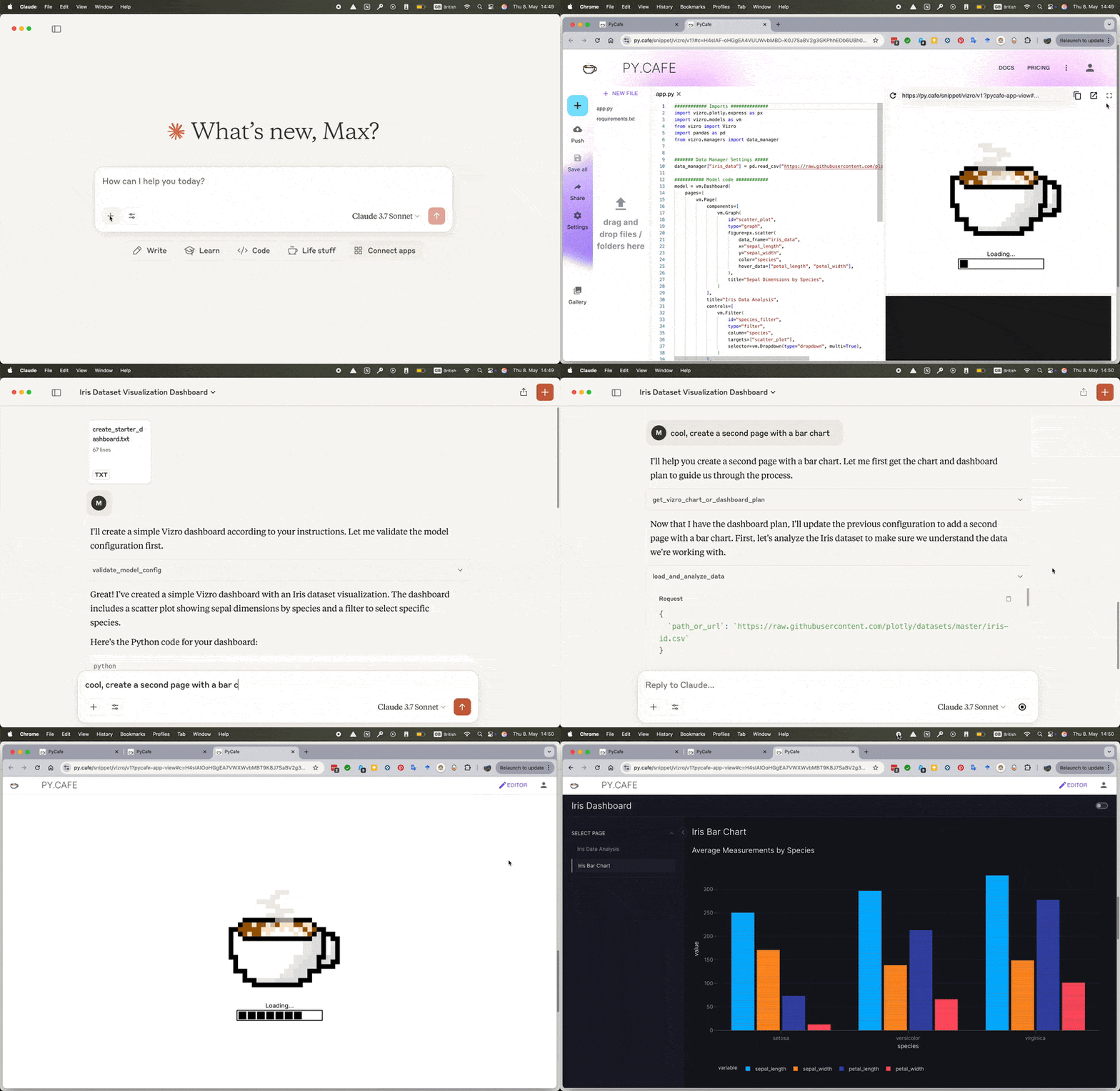
Compatible with MCP-enabled LLM clients such as Cursor or Claude Desktop.

Vizro-AI
Use LLMs to generate charts and dashboards.
Vizro-AI dashboard generation is no longer actively developed and is superseded by Vizro-MCP. Vizro-AI supports only chart generation from version 0.4.0.
Vizro-AI is a separate package (called vizro_ai) that extends Vizro to incorporate LLMs. Use it to build interactive Vizro charts and dashboards, by simply describing what you need in plain English or other languages.
Visit the Vizro-AI documentation for more details.
Installation and first steps
pip install vizro
See the installation guide for more information.
The get started documentation explains how to create your first dashboard.
Packages
This repository is a monorepo containing the following packages:
| Folder | Version | Documentation |
|---|---|---|
| vizro-core | Vizro Docs | |
| vizro-ai | Vizro-AI Docs | |
| vizro-mcp | Vizro-MCP Docs |
Community and development
We encourage you to ask and discuss any technical questions via the GitHub Issues. This is also the place where you can submit bug reports or request new features.
Want to contribute to Vizro?
The contributing guide explains how you can contribute to Vizro.
You can also view current and former contributors here.
Want to report a security vulnerability?
See our security policy.
License
vizro is distributed under the terms of the Apache License 2.0.
Parameters
user_plan
The type of Vizro thing the user wants to create
required
user_host
The host the user is using, if 'ide' you can use the IDE/editor to run python code
required
advanced_mode
Only call if you need to use custom CSS, custom components or custom actions.
No need to call this with advanced_mode=True if you need advanced charts,
use `custom_charts` in the `validate_dashboard_config` tool instead.
Parameters
model_name
Name of the Vizro model to get schema for (e.g., 'Card', 'Dashboard', 'Page')
required
Parameters
data_name
Name of the dataset to get sample data for
required
Parameters
path_or_url
Absolute (important!) local file path or URL to a data file
required
Parameters
dashboard_config
Either a JSON string or a dictionary representing a Vizro dashboard model configuration
required
data_infos
List of DFMetaData objects containing information about the data files
required
custom_charts
List of ChartPlan objects containing information about the custom charts in the dashboard
required
auto_open
Whether to automatically open the PyCafe link in a browser
Parameters
chart_config
A ChartPlan object with the chart configuration
required
data_info
Metadata for the dataset to be used in the chart
required
auto_open
Whether to automatically open the PyCafe link in a browser
out of 100
Security Review
Integration: Vizro
Repository: https://github.com/mckinsey/vizro
Commit: latest
Scan Date: 2026-03-14 12:15 UTC
Security Score
55 / 100
Tier Classification
Reject
OWASP Alignment
OWASP Rubric
- Standard: OWASP Top 10 (2021) aligned review
- Core methodology: architecture context, trust boundaries, data-flow tracing, threat modeling, control verification, and evidence-backed validation
- Key characteristics considered: exploitability, impact, likelihood, attacker preconditions, and business context
OWASP Security Category Mapping
- A01 Broken Access Control: none
- A02 Cryptographic Failures: 2 finding(s)
- A03 Injection: none
- A04 Insecure Design: none
- A05 Security Misconfiguration: none
- A06 Vulnerable and Outdated Components: none
- A07 Identification and Authentication Failures: 1 finding(s)
- A08 Software and Data Integrity Failures: none
- A09 Security Logging and Monitoring Failures: none
- A10 Server-Side Request Forgery: none
Static Analysis Findings (Bandit)
High Severity
None
Medium Severity
- Use of exec detected. in vizro-core/tests/unit/vizro/models/test_base.py:333 (confidence: HIGH)
Low Severity
- Consider possible security implications associated with the subprocess module. in tools/check_package_release.py:4 (confidence: HIGH)
- Starting a process with a partial executable path in tools/check_package_release.py:45 (confidence: HIGH)
- subprocess call - check for execution of untrusted input. in tools/check_package_release.py:45 (confidence: HIGH)
- Use of assert detected. The enclosed code will be removed when compiling to optimised byte code. in vizro-ai/tests/unit/vizro-ai/agents/response_models/test_response_model.py:84 (confidence: HIGH)
- Use of assert detected. The enclosed code will be removed when compiling to optimised byte code. in vizro-ai/tests/unit/vizro-ai/agents/response_models/test_response_model.py:167 (confidence: HIGH)
- Use of assert detected. The enclosed code will be removed when compiling to optimised byte code. in vizro-ai/tests/unit/vizro-ai/agents/response_models/test_response_model.py:280 (confidence: HIGH)
- Use of assert detected. The enclosed code will be removed when compiling to optimised byte code. in vizro-ai/tests/unit/vizro-ai/agents/response_models/test_response_model.py:292 (confidence: HIGH)
- Use of assert detected. The enclosed code will be removed when compiling to optimised byte code. in vizro-ai/tests/unit/vizro-ai/agents/response_models/test_response_model.py:313 (confidence: HIGH)
- Use of assert detected. The enclosed code will be removed when compiling to optimised byte code. in vizro-ai/tests/unit/vizro-ai/agents/response_models/test_response_model.py:330 (confidence: HIGH)
- Use of assert detected. The enclosed code will be removed when compiling to optimised byte code. in vizro-ai/tests/unit/vizro-ai/agents/response_models/test_response_model.py:336 (confidence: HIGH)
- Use of assert detected. The enclosed code will be removed when compiling to optimised byte code. in vizro-ai/tests/unit/vizro-ai/agents/response_models/test_response_model.py:338 (confidence: HIGH)
- Use of assert detected. The enclosed code will be removed when compiling to optimised byte code. in vizro-ai/tests/unit/vizro-ai/agents/response_models/test_response_model.py:343 (confidence: HIGH)
- Use of assert detected. The enclosed code will be removed when compiling to optimised byte code. in vizro-ai/tests/unit/vizro-ai/agents/response_models/test_response_model.py:349 (confidence: HIGH)
- Use of assert detected. The enclosed code will be removed when compiling to optimised byte code. in vizro-ai/tests/unit/vizro-ai/agents/response_models/test_response_model.py:350 (confidence: HIGH)
- Use of assert detected. The enclosed code will be removed when compiling to optimised byte code. in vizro-ai/tests/unit/vizro-ai/agents/response_models/test_response_model.py:359 (confidence: HIGH)
- Use of assert detected. The enclosed code will be removed when compiling to optimised byte code. in vizro-ai/tests/unit/vizro-ai/agents/response_models/test_response_model.py:360 (confidence: HIGH)
- Use of assert detected. The enclosed code will be removed when compiling to optimised byte code. in vizro-ai/tests/unit/vizro-ai/agents/response_models/test_response_model.py:362 (confidence: HIGH)
- Use of assert detected. The enclosed code will be removed when compiling to optimised byte code. in vizro-ai/tests/unit/vizro-ai/agents/response_models/test_response_model.py:367 (confidence: HIGH)
- Use of assert detected. The enclosed code will be removed when compiling to optimised byte code. in vizro-ai/tests/unit/vizro-ai/agents/response_models/test_response_model.py:373 (confidence: HIGH)
- Use of assert detected. The enclosed code will be removed when compiling to optimised byte code. in vizro-ai/tests/unit/vizro-ai/agents/response_models/test_response_model.py:375 (confidence: HIGH)
Build Status
SKIPPED
Build step was skipped to avoid running untrusted build commands by default.
Tests
Detected (pytest)
Documentation
README: Present
Dependency file: Present
AI Security Review
OWASP-Aligned Security Review Report for Vizro
1) OWASP Review Methodology Applied
- Architecture & Context: I reviewed the repo structure, focused on MCP integration (vizro-mcp) and the AI agent code (vizro-ai) which execute or produce Python code. I inspected entry points: vizro-mcp/src/vizro_mcp/server.py and vizro-ai agent/response model code.
- Trust Boundaries & Entry Points: Identified external inputs: MCP tool inputs (file paths, URLs, dashboard/chart configs) and LLM-produced chart code consumed by vizro-ai.
- Data Flows: Traced flows for uploaded/remote data (load_and_analyze_data -> path_or_url_check -> load_dataframe_by_format -> pandas.read_*), for LLM-generated code (response_models constructs code, runs _safeguard_check in some places, and uses exec), and for preview generation (create_pycafe_url -> webbrowser.open).
- Threat Modeling: Focused on code execution (RCE), SSRF/data exfiltration, privilege escalation via global namespace pollution, insecure deserialization (none found), and unsafe subprocess usage in tooling.
- Controls Verification: Verified presence and coverage of safeguards (vizro-ai/_utils/_safeguard.py) and whether they are consistently applied.
- Validation with Code Evidence: I referenced concrete files and code paths and used static-search results to validate findings.
2) OWASP Top 10 2021 Mapping
- A01 Broken Access Control: Not directly observed.
- A02 Cryptographic Failures: Not applicable here.
- A03 Injection: RCE via exec of untrusted code (vizro-ai) -> A03.
- A04 Insecure Design: Running arbitrary code in-process and fetching remote resources w/o host validation -> A04.
- A05 Security Misconfiguration: webbrowser.open behavior, default auto_open=True could be dangerous in some deployments -> A05.
- A06 Vulnerable and Outdated Components: dependency usage flagged (bandit) in tooling; dependency review recommended -> A06.
- A07 Identification and Authentication Failures: None found.
- A08 Software and Data Integrity Failures: Executing LLM-produced code without robust sandboxing -> A08.
- A09 Security Logging and Monitoring Failures: No evidence of robust request/exec logging or runtime monitoring for executed code -> A09.
- A10 Server-Side Request Forgery (SSRF): pandas remote reads can fetch arbitrary URLs -> A10.
3) Critical Vulnerabilities
A. Remote Code Execution (RCE) β Direct exec of untrusted Python
- File: vizro-ai/src/vizro_ai/agents/response_models/_response_models.py
- Evidence: exec(...) usage executing LLM-produced code. Search results show exec at line ~65 ("exec(code, namespace, ldict) # nosec # noqa: S102"). The function _exec_code executes the supplied code in a provided namespace (the module's globals are later used in higher-level APIs). The repository also exposes APIs (BaseChartPlan.get_chart_function and ChartPlan.get_chart_function) that call _exec_code to produce callable functions from generated code without a mandatory, enforced call to the safeguard.
- Severity: Critical (A03 Injection / A08 Software & Data Integrity).
- Exploitability: High β an attacker who controls LLM output or supplies crafted chart_code can execute arbitrary Python in the process.
- Impact: Full RCE in the process; arbitrary file access, network access, process control, or host compromise.
- Likelihood: Moderate-High depending on deployment: if the MCP runs locally and the LLM output is untrusted, or if the vizro-ai agent is used with an external model, exploitability is high.
- Attacker Preconditions: Ability to supply or influence generated chart_code or any API that triggers _exec_code; many agent workflows accept LLM-produced code.
- Concrete Remediation:
- Immediately stop executing untrusted code in-process. Replace exec-based execution with isolated/sandboxed execution (separate process, container, or ephemeral environment) with strict resource limits and no network access.
- If in-process exec is unavoidable during development/testing, enforce _safeguard_check on all code paths and execute under a strongly restricted namespace (no direct globals(), and a locked-down builtins whitelist). Preferably do both: sandbox + pre-check.
- Specifically: in vizro-ai/src/vizro_ai/agents/response_models/_response_models.py, before exec(code,...): call _safeguard_check(code) (but see note below: AST checks are not sufficient alone). Then change _exec_code to execute in a minimal namespace e.g. namespace = {"builtins": safe_builtins_dict} rather than globals(), or (better) execute code in a separate OS-level sandbox.
- File: vizro-ai/src/vizro_ai/agents/response_models/_response_models.py: exec is at ~line 65; change to run in isolated subprocess/container and remove use of process globals.
Why this is critical: exec allows arbitrary Python execution. Even with AST-based checks, it's easy to find bypasses (see "Inconsistent safeguards" below).
4) High Severity Issues
B. Inconsistent/Missing Safeguard Enforcement (leading to RCE)
- File: vizro-ai/src/vizro_ai/agents/response_models/_response_models.py
- Evidence: Some validation paths call _safeguard_check (e.g., in _test_execute_chart_code they call _safeguard_check before _exec_code) while other code paths call _exec_code directly (e.g., BaseChartPlan.get_chart_function -> creates code_to_execute and calls _exec_code without calling _safeguard_check). Search shows get_chart_function at ~line 221 in that file.
- Severity: High (A03 / A08)
- Remediation:
- Enforce a single canonical execution function that always performs the safeguard and executes in an isolated namespace / sandbox. Add a code path-level check-in (unit tests and CI) that any call to _exec_code must pass through a wrapper that ran _safeguard_check.
- At minimum, add a direct call to _safeguard_check in BaseChartPlan.get_chart_function and ChartPlan.get_chart_function before calling _exec_code.
- File: vizro-ai/src/vizro_ai/agents/response_models/_response_models.py: add _safeguard_check(code_to_execute) circa line ~210-223 prior to namespace execution.
C. Execution in module globals β namespace pollution and privilege escalation
- File: vizro-ai/src/vizro_ai/agents/response_models/_response_models.py
- Evidence: _test_execute_chart_code and get_chart_function use namespace = globals() and then _exec_code uses exec(code, namespace, ldict) and then namespace.update(ldict). Executing untrusted code with globals() gives it access to module-level objects and the ability to mutate them.
- Severity: High (A04/A08)
- Remediation: execute code in a fresh/limited globals dict; do not use the real module globals(). E.g., create namespace = {"builtins": safe_builtins}, then exec; or better: run in an OS-level sandbox (subprocess with restricted user) and marshal results back.
- File: vizro-ai/src/vizro_ai/agents/response_models/_response_models.py: replace namespace = globals() with a limited namespace.
D. SSRF / Arbitrary Remote Fetch via pandas read_* (load remote data)
- File: vizro-mcp/src/vizro_mcp/_utils/utils.py
- Evidence: load_dataframe_by_format calls pd.read_csv / read_json / read_html / read_excel / read_parquet directly on user-supplied path_or_url when path_or_url_check detects remote. No host filtering, no private network prevention, no timeout enforced here (pandas has own timeouts if http libs used, but default requests can hang). Function path_or_url_check considers strings starting with "www." as remote.
- Severity: High (A10 SSRF)
- Exploitability: High if MCP server runs in an environment with access to internal network. An attacker can supply a URL like http://169.254.169.254/latest/meta-data to read cloud metadata.
- Remediation:
- Implement strict allowlist of permitted remote hosts or block private IP ranges (RFC1918, localhost, link-local, cloud metadata addresses) when the provided path_or_url is remote. Use parsed URL to inspect netloc and resolve IP to check whether it's private. Reject or require explicit administrator confirmation for internal IPs.
- Add timeouts and retries to any network fetch; prefer using a controlled HTTP client with strict timeout and no redirects (httpx with timeout and trust_env=False).
- File: vizro-mcp/src/vizro_mcp/_utils/utils.py: modify load_dataframe_by_format to fetch remote content via a controlled fetch helper that enforces allowlists and timeouts before passing bytes or a file-like object to pandas.
E. webbrowser.open auto-opening (server-side) of constructed URLs
- File: vizro-mcp/src/vizro_mcp/server.py
- Evidence: validate_dashboard_config and validate_chart_code call webbrowser.open(pycafe_url) if pycafe_url and auto_open True. Search shows calls at lines ~291 and ~356.
- Severity: Medium/Low depending on deployment (A05 Security Misconfiguration). If the MCP is run on a headless server, webbrowser.open might be harmless; if it's running in a client environment, it will open a browser unexpectedly; it could be abused if the URL were attacker-controlled (pycafe_url is built to py.cafe so limited). Nonetheless, prefer not to auto-open from server by default.
- Remediation: Default auto_open to False for server deployments, or make this feature opt-in in config. Log the event instead of opening the browser by default.
5) Medium Severity Issues
F. Safeguard Bypass Risk β AST/string checks are brittle
- File: vizro-ai/src/vizro_ai/agents/_utils/_safeguard.py and _constants.py
- Evidence: Safeguard uses AST traversal and string matching (ast.unparse(node) and regex to find builtins). While good, these checks can be bypassed by creative constructs (e.g., using attribute accesses, dynamic import via importlib if not explicitly blacklisted, building names from concatenation and using getattr on safe modules). Some checks inspect only the first import name (see _check_imports: for ast.Import it selects node.names[0].name, not all names). In _check_imports, the code sets package = module.split('.')[0] where module for ImportFrom is node.module - if node.module is None or complex, edge cases exist. REDLISTED_DATA_HANDLING is based on substrings (e.g., '.read_csv') and could be circumvented by building a string and calling eval β though builtins eval is flagged. However, attackers can craft more subtle ways (use compiled C extensions already whitelisted e.g. numpy to call into OS?) β complex but possible.
- Severity: Medium
- Remediation: Do not rely on AST-only heuristics as sole protection. Use execution sandboxing (OS-level containers, seccomp, dropped privileges) and network isolation. Improve AST checks to enumerate all imported names and ensure imports in nested nodes are detected. For imports, iterate node.names for ast.Import. Add explicit detection for import via importlib.import_module and disallow attribute access patterns that lead to module acquisition.
- File: vizro-ai/src/vizro_ai/agents/_utils/_safeguard.py: update _check_imports to inspect all names in node.names for ast.Import nodes.
G. Path handling & local file access guidance
- File: vizro-mcp/src/vizro_mcp/server.py and utils.path_or_url_check in vizro-mcp/src/vizro_mcp/_utils/utils.py
- Evidence: The public API claims "Absolute (important!) local file path or URL", but code only checks Path(string).is_file() and does not enforce absolute path. Relative paths may allow reading files under server working directory unexpectedly.
- Severity: Medium
- Remediation: Enforce absolute paths for local files (Path.resolve().is_file() and check Path.is_absolute()), or normalize and restrict paths to an allowed data directory. Document required behavior and validate inputs strictly.
H. Subprocess usage in tooling (low risk but flagged)
- File: tools/check_package_release.py
- Evidence: subprocess.check_output([...], cwd=f"{attempted_package_name}") (line ~45) constructing cwd from constant names only; bandit flagged partial executable path concerns.
- Severity: Low
- Remediation: Validate paths exist before invoking subprocess, use full path for binaries or rely on shell=False (already used), handle exceptions robustly. This is not part of MCP runtime but CI tooling; keep it in mind.
6) Low Severity / Best Practice Issues
- create_pycafe_url builds a very long URL containing compressed base64 code and automatically opens it (pycafe URL). Not a vulnerability but can leak long code into logs or referer; be mindful when including secrets in code.
- File: vizro-mcp/src/vizro_mcp/_utils/utils.py create_pycafe_url at ~line 114.
- convert_github_url_to_raw regex could be more permissive/robust; not security-critical.
- Tests contain assert statements flagged by bandit; these are test code artifacts only.
7) Key Risk Characteristics (for major findings)
- RCE via exec:
- Exploitability: High if attacker can supply or influence chart_code (which is the design for LLM-driven workflows). LLM output can be crafted.
- Impact: Full host compromise of the process, potential lateral movement, data exfiltration.
- Likelihood: Moderate depending on deployment (higher when used with untrusted LLM outputs or when the MCP is exposed as a service).
- Preconditions: Ability to supply LLM model responses or user input to the vizro-ai agent; access to agent invocation API (local or remote).
- SSRF via pandas reads:
- Exploitability: High in cloud deployment where server can reach internal metadata services.
- Impact: Sensitive metadata leak (e.g., cloud credentials), internal network scanning.
- Likelihood: High if server is in cloud environment and accepts untrusted URLs.
- Preconditions: Attacker supplies URL to MCP load_and_analyze_data.
8) Positive Security Practices Observed
- The project includes an AST-based safeguard in vizro-ai/_utils/_safeguard.py and unit tests that exercise detection of malicious imports, builtins and data access patterns.
- There's pydantic validation of models (vizro-mcp/_schemas/schemas.py) which enforces patterns and types for ChartPlan and other models.
- Use of unit tests to assert safeguard behavior (vizro-ai/tests/unit/... tests).
- Effort to avoid executing untrusted code unconditionally (there are explicit checks in some code paths).
- Minimal and explicit dependency pins in pyproject.toml for vizro-mcp.
9) Recommendations (file:line references and actionable fixes)
Note: line numbers below reference search outputs and are approximate to the lines flagged by search. Please verify exact lines in your editor.
Critical (must-fix):
1. Replace in-process exec with sandboxed execution
- File: vizro-ai/src/vizro_ai/agents/response_models/_response_models.py (exec at ~line 65)
- Severity: Critical (A03, A08)
- Recommendation: Remove direct exec; run generated code in an isolated subprocess or container with:
- No network access
- No mounts to host filesystem (or read-only isolated temp dir)
- Resource & time limits (CPU, memory, timeout)
- Drop privileges and run as an unprivileged user
- If immediate fix required: at least run exec in a minimal global namespace (no access to real globals) and enforce _safeguard_check prior to exec.
- Enforce safeguard on all code execution paths
- Files: vizro-ai/src/vizro_ai/agents/response_models/_response_models.py
- Ensure BaseChartPlan.get_chart_function and ChartPlan.get_chart_function call _safeguard_check on code_to_execute prior to calling _exec_code. (approx lines ~200-225)
- Severity: High (A03)
-
Recommendation: Add _safeguard_check(code_to_execute) and unit tests verifying any call path is guarded.
-
Avoid using module globals as exec namespace
- File: vizro-ai/src/vizro_ai/agents/response_models/_response_models.py (get_chart_function around ~line 221 and _exec_code around ~line 57)
- Severity: High
- Recommendation: Use an explicit minimal namespace, e.g.:
safe_globals = {"builtins": {"len": len, "range": range, ...}} # only truly safe builtins
exec(code, safe_globals, {} )
But note: this is not a replacement for sandboxing. Prefer isolated process.
High/Medium:
4. Prevent SSRF and restrict remote file fetches
- File: vizro-mcp/src/vizro_mcp/utils/utils.py (load_dataframe_by_format and path_or_url_check; pd.read* usage around lines ~20-90)
- Severity: High (A10)
- Recommendation: Implement a controlled fetch helper for remote URLs that:
- Resolves the host and blocks private/reserved IP ranges and cloud metadata addresses (e.g., 169.254.169.254, 169.254.169.123 for AWS/other clouds)
- Enforces timeout and disallows redirects
- Logs the request
- Optionally allowlist approved hosts only
- Use httpx or requests with timeout and verify SSL
- After fetching, pass the retrieved bytes (or a temp file) to pandas reader functions instead of passing the raw URL.
- Make webbrowser.open opt-in for non-local deployments
- File: vizro-mcp/src/vizro_mcp/server.py (webbrowser.open calls at ~291 and ~356)
- Severity: Medium (A05)
-
Recommendation: Default auto_open to False in server contexts where opening a browser is inappropriate; or detect headless environments and skip opening.
-
Tighten AST import checks
- File: vizro-ai/src/vizro_ai/agents/_utils/_safeguard.py (function _check_imports)
- Severity: Medium
- Recommendation: For ast.Import nodes, iterate all node.names (not just [0]); for ImportFrom, handle module==None cases robustly. Also detect importlib, import, import via attributes, and attempts to access builtin modules through existing objects.
Low:
7. Validate local path usage as absolute and/or restricted
- File: vizro-mcp/src/vizro_mcp/_utils/utils.py path_or_url_check
- Severity: Medium
- Recommendation: Enforce Path.is_absolute() for local files unless intentionally supporting relative paths; restrict range of accessible directories.
- CI/tooling subprocess hardening
- File: tools/check_package_release.py (subprocess.check_output at ~line 45)
- Severity: Low
- Recommendation: Validate cwd exists before use; catch CalledProcessError explicitly; consider absolute path to hatch binary or ensure PATH is constrained.
10) Next Tier Upgrade Plan (Bronze/Silver/Gold/Reject model)
- Current Likely Tier: Bronze.
- Rationale: The project demonstrates awareness of risks (AST-based safeguards, tests) and applies some validation, but executes untrusted code in-process and accepts remote URLs without SSRF protections. Those are blocking for higher trust tiers.
- Target Next Tier: Silver.
-
Requirements to reach Silver (prioritized):
- Eliminate in-process exec of untrusted code or fully sandbox it (isolate execution via subprocess/container with strict restrictions). (Critical)
- Ensure every code execution path enforces _safeguard_check and harden AST checks. (High)
- Add SSRF protections for remote data retrieval (host/IP allowlist/blocklist, timeouts). (High)
- Replace usage of globals() for exec with restricted namespaces or sandboxing. (High)
- Default non-interactive behaviors (like auto opening browsers) to disabled for server deployments and add logging/observability for code execution events. (Medium)
- Add runtime logging/monitoring and audit trails for executed code (what code, caller, timestamps). (Medium)
-
To reach Gold (higher trust):
- Adopt OS-level sandboxing with e.g. containers combined with a policy engine for allowed imports, network, and file access.
- Implement attestation and code signing workflows for any custom charts or user-supplied code to validate integrity before execution.
- Add runtime monitoring (syscalls, process constraints) and alerting for anomalous behavior.
Summary of concrete prioritized actions (top 5):
1. Stop running LLM-produced code with exec in-process. Implement an execution sandbox (container/subprocess) with strict network and filesystem controls. (Critical)
2. Enforce _safeguard_check on every path that executes code; add unit and integration tests to ensure coverage. (High)
3. Implement SSRF protections for remote data fetches in vizro-mcp: block internal IP ranges and cloud metadata addresses. (High)
4. Replace namespace=globals() usage with isolated namespaces or sandboxed execution. (High)
5. Make webbrowser.open opt-in and ensure server-mode defaults to no auto-opening; add logging for any opened preview links. (Medium)
Appendix: Code Evidence (file:approx_line)
- vizro-ai/src/vizro_ai/agents/response_models/_response_models.py: exec(code, namespace, ldict) # nosec # noqa: S102 (approx line 65)
- vizro-ai/src/vizro_ai/agents/response_models/_response_models.py: def get_chart_function(self, chart_name: str, vizro: bool) -> Callable[..., go.Figure]: (approx line 221) β calls _exec_code without explicit safeguard.
- vizro-ai/src/vizro_ai/agents/_utils/_safeguard.py: def _safeguard_check(code: str): (approx line 76) β AST-based checks (imports, builtins, redlisted patterns).
- vizro-mcp/src/vizro_mcp/_utils/utils.py: def load_dataframe_by_format(...) -> pd.DataFrame: (calls pd.read_csv/json/html/excel/parquet directly on provided path_or_url) (approx lines 20-70)
- vizro-mcp/src/vizro_mcp/server.py: browser_opened = webbrowser.open(pycafe_url) (approx lines 291 and 356)
- tools/check_package_release.py: subprocess.check_output([...], cwd=f"{attempted_package_name}") (approx line 45)
If you want, I can prepare a small patch (diff) for the immediate mitigations:
- Add calls to _safeguard_check in the get_chart_function paths.
- Replace namespace = globals() with a safe empty namespace for exec (short-term mitigation).
- Add initial SSRF host check function and call it in load_and_analyze_data before handing a remote URL to pandas.
Conclusion
The codebase shows good intentions (AST-based safeguards, testing) and is well-structured, but there is a critical and present RCE risk due to exec usage and inconsistent enforcement of safeguards. Additionally, remote data fetching without SSRF protections poses a high-risk vector in hosted deployments. Prioritize sandboxing and consistent safeguard enforcement before promoting this integration to a higher trust tier.
Summary
Security Score: 55/100 (Reject)
Static analysis found 0 high, 1 medium, and 1161 low severity issues.
Build step skipped for safety.
Tests detected.
Sign in to leave a review
No reviews yet β be the first!
Configuration
DEFS
required
string
Detected from tools manifest
Docker Image
Docker HubPublished by github.com/mckinsey