Webflow
by slimslenderslacks · Devops
Webflow MCP
A Node.js server implementing Model Context Protocol (MCP) for Webflow using the Webflow JavaScript SDK. Enable AI Clients to interact with the Webflow APIs through the Model Context Protocol (MCP). Learn more about Webflow's APIs in the developer documentation.
ℹ Prerequisites
▶️ Quick start
-
Get your Webflow API token
-
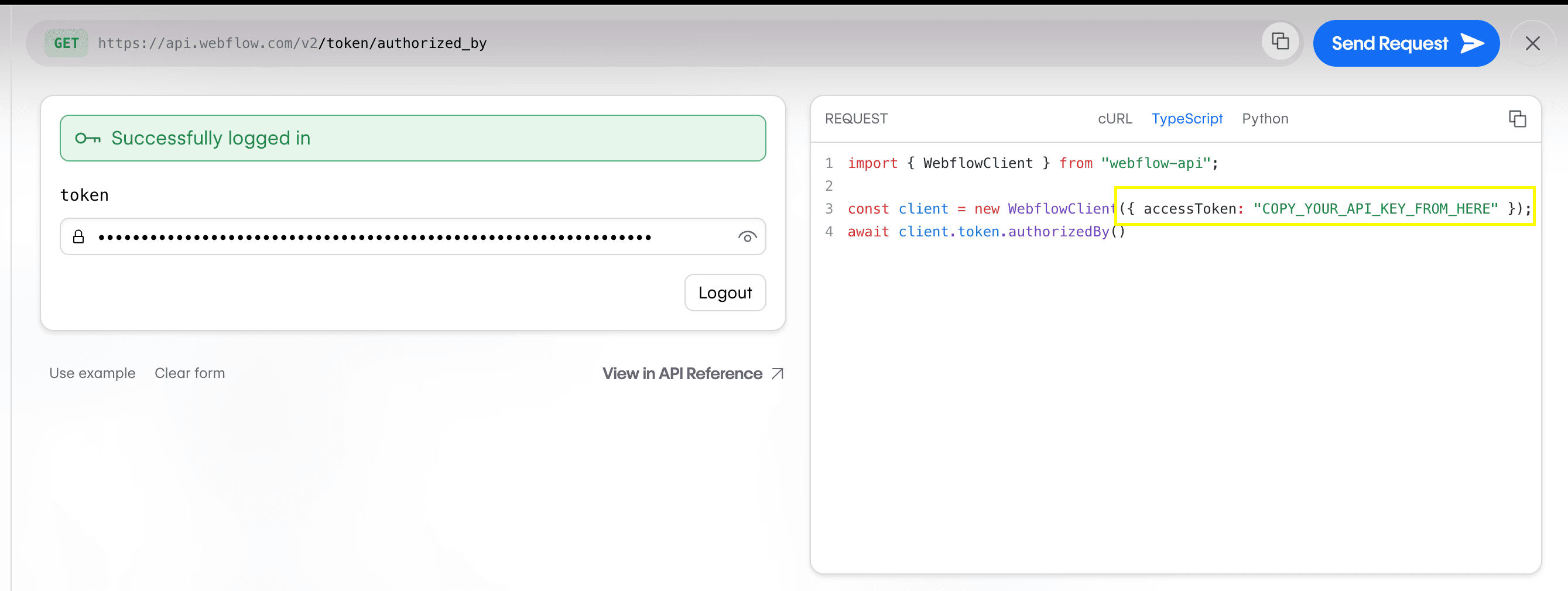
Go to Webflow's API Playground
- Log in and generate a token
-
Copy the token from the Request Generator
-
Add to your AI editor
json
   {
     "mcpServers": {
       "webflow": {
         "command": "npx",
         "args": ["-y", "[email protected]"],
         "env": {
           "WEBFLOW_TOKEN": "YOUR_API_TOKEN"
         }
       }
     }
   }
For Cursor:
- Go to Settings → Cursor Settings → MCP
- Click
+ Add New Global MCP Server - Paste configuration
- Replace
YOUR_API_TOKENwith the token you copied earlier - Save and restart Cursor
For Claude Desktop:
- Open Settings → Developer
- Click
Edit Config - Open
claude_desktop_config.jsonin a code editor and paste configuration - Replace
YOUR_API_TOKENwith the token you copied earlier - Save and restart Claude
❓ Troubleshooting
If you are having issues starting the server in your MCP client e.g. Cursor or Claude Desktop, please try the following.
Ensure you have a valid Webflow API token
- Go to Webflow's API Playground, log in and generate a token, then copy the token from the Request Generator
- Replace
YOUR_API_TOKENin your MCP client configuration with the token you copied - Save and restart your MCP client
Ensure you have the Node and NPM installed
Run the following commands to confirm you have Node and NPM installed:
node -v
npm -v
Clear your NPM cache
Sometimes clearing your NPM cache can resolve issues with npx.
npm cache clean --force
Fix NPM global package permissions
If npm -v doesn't work for you but sudo npm -v does, you may need to fix NPM global package permissions. See the official NPM docs for more information.
Note: if you are making changes to your shell configuration, you may need to restart your shell for changes to take effect.
🛠️ Available tools
Sites
sites - list; // List all sites
sites - get; // Get site details
sites - publish; // Publish site changes
Pages
pages - list; // List all pages
pages - get - metadata; // Get page metadata
pages - update - page - settings; // Update page settings
pages - get - content; // Get page content
pages - update - static - content; // Update page content
CMS
collections - list; // List collections
collections - get; // Get collection details
collections - create; // Create a collection
collection - fields - create - static; // Create a static field
collection - fields - create - option; // Create an option field
collection - fields - create - reference; // Create a reference field
collection - fields - update; // Update a custom field
collections - items - create - item - live; // Create items
collections - items - update - items - live; // Update items
🗣️ Prompts & Resources
This implementation does not include prompts and resources. However, this may change in the future.
🚧 Development mode
If you want to run the server in development mode, you can install dependencies and run the server using the following command:
- Clone and install:
shell
   git clone [email protected]:webflow/mcp-server.git
   cd mcp-server
   npm install
- Add your token:
shell
   # .env
   WEBFLOW_TOKEN=your_token_here
- Start development server:
shell
   npm run dev
📄 Webflow Developer resources
No tools listed for this server.
Security Audit
This integration has not been scanned yet. Once a security audit has been completed, the results will be displayed here.
Sign in to leave a review
No reviews yet — be the first!
Configuration
WEBFLOW_TOKEN
required
secret
Docker Image
Docker HubDocker MCP Toolkit
docker mcp server enable webflow
Or download webflow.yaml
and run docker mcp catalog add my-catalog webflow webflow.yaml
Links
Published by github.com/slimslenderslacks